Has anyone heard of the book rental service, BookSwim.com? The concept sounds like a great idea but maybe a bit late for our time? Also, why pay to rent books when you can get them free from the library or used through Amazon.com? I can see the appeal for textbooks but there are so many other rentals sites and schools are leaning towards iPad learning. Exhibit A, my Alma Mater, the Webb School of Knoxville, who is requiring all students to buy or rent and iPad for class in 2012.
It seems the next likely step is to figure out a way for people to rent eReaders and eBooks. Many public libraries already have plans in place with software such as Overdrive and are working with vendors like Kindel to come up with a renting solution. While eBooks take up no physical space and can downloaded in the blink of an eye, how long do they last? Digital media is essentially ones and zeroes, which poses the digital migration question. As new and updated devices hit the market, what will happen to one's digital content? Will ebooks be unreadable by new versions or will they simply expire from our devices? Either way, one cannot loan out an eBook easily, place on their bookshelf or sell it on Amazon. I'm sure 2011 will answer some if not all of these questions.
While I'm warming up to the idea of eContent, I still prefer my "tree books" for now.
Links:
BookSwim
http://www.bookswim.com
Webb School of Knoxville
http://www.webbschool.org/podium/default.aspx?t=134522
Brooklyn Public Library
http://www.brooklynpubliclibrary.org/digital.jsp
Thursday, February 3, 2011

Wednesday, January 26, 2011
The Next Library Pet? LOC's Visiting Hawk Historian Finally Captured.
Hawk loose inside Library of Congress finally captured
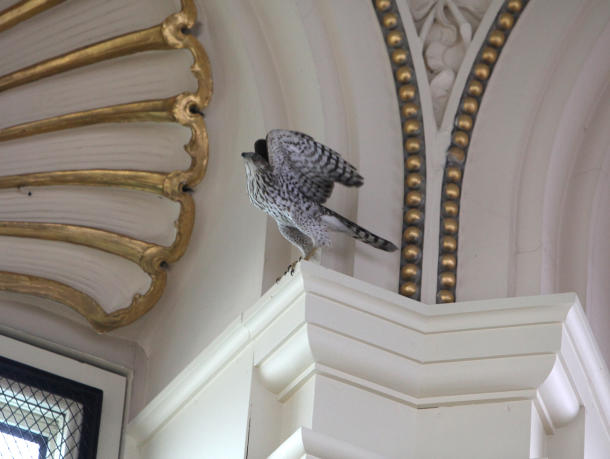
Birds of prey aren't generally known for their love of learning, but over the past week a wayward hawk has set up shop inside the hallowed halls of the Library of Congress, perhaps to evade the bitter cold snap that's recently gripped the eastern United States.
The Cooper's hawk made the library's main reading room its new home last Wednesday and officials have been trying to capture it ever since. Animal rescue workers tried deploying baited traps and nets, but the bird wasn't budging. Indeed, it became such a fixture at the library that the Washington Post called upon its readers to give the hawk a name -- "Jefferson" won out, in honor of the president whose library furnished the basis of the Library's collection. (For our part, we favored "Poindexter," since seeing a mighty hawk hang around a library all day is clearly an occasion to celebrate nerd pride.)
But alas, all things come to an end, and Jefferson was captured, via a starling-baited trap, around 10 am eastern time. Reports the Washington Post's appropriately named Elizabeth Flock:

Jefferson the hawk was safely captured shortly before 9 a.m. this morning by experts from the Raptor Conservancy of Virginia and the U.S. Fish and Wildlife Service. They laid a trap with two starling birds inside to bait the hungry hawk, who hadn't eaten since the frozen quail bait on Sunday. Jefferson swooped down to eat the starlings, and her talons quickly caught on to the trap's hooks. It took only 25 minutes for her to be captured.
Jefferson was then put into a box with breathing holes for safe transport to raptor rehab at the Raptor Conservancy. The bird experts estimated that Jefferson is now the size of a male hawk--females are usually larger than males--so it was likely she had lost weight and is emaciated. They transported her out of the library quickly to get her to food and drink.
So Jefferson was apparently starving herself in the pursuit of knowledge, in other words. It's only a matter of time, we're guessing, before she enrolls in graduate school.(Photo: AP/Library of Congress/Abby Brack)
Monday, December 6, 2010
A Great Article from Metro on Tweaking Your Résumé
Tips to fix your résumé
Is it time to fix up your old résumé? Don’t begin to edit it until you read these tips from Evelyn Salvador, author of “Step-by-Step Résumés.”
Remove personal pronouns. The subject (I, me or my) is understood, and you should leave it out of each sentence. If your résumé contains any of these words, delete them and restructure as necessary.
Check for action verbs. Be sure each bullet in your Professional Experience section starts with an action verb or adverb preceding the action verb. Also be sure to include action verbs associated with your profession.
Delete any redundant or superfluous words. Review each sentence or bullet. Delete any words that your sentence reads fine without, such as “the” and “that,” as well as unnecessary “fluff” words. Edit down to the most concise sentence possible without omitting any important content, such as achievements.
Include personal attributes. Double-check that your primary attributes are included in your Professional Summary section and cover letter.
Prioritize your bullets. Review your responsibilities and achievements in each position and move the more important and targeted ones closer to the top under each position.
Subdivide and categorize bullets. If you have many responsibility and achievement bullets under each position (say, more than 10), you can divide them into two categories (Responsibilities and Achievements) and subtitle them as such under each position for easier reading.
Check for quantifying information. Ask yourself, “Did I include how many, how much, how often, how big, how fast, how well and so on?”
Verify that “CAR” and benefit information is included. Do your achievements include the challenge you faced, the action you took and the result? Be sure you show how well you performed these functions and always include the benefit(s) to the company.
Vary bullet line length. Try for a good mix of line lengths.
Remove personal pronouns. The subject (I, me or my) is understood, and you should leave it out of each sentence. If your résumé contains any of these words, delete them and restructure as necessary.
Check for action verbs. Be sure each bullet in your Professional Experience section starts with an action verb or adverb preceding the action verb. Also be sure to include action verbs associated with your profession.
Delete any redundant or superfluous words. Review each sentence or bullet. Delete any words that your sentence reads fine without, such as “the” and “that,” as well as unnecessary “fluff” words. Edit down to the most concise sentence possible without omitting any important content, such as achievements.
Include personal attributes. Double-check that your primary attributes are included in your Professional Summary section and cover letter.
Prioritize your bullets. Review your responsibilities and achievements in each position and move the more important and targeted ones closer to the top under each position.
Subdivide and categorize bullets. If you have many responsibility and achievement bullets under each position (say, more than 10), you can divide them into two categories (Responsibilities and Achievements) and subtitle them as such under each position for easier reading.
Check for quantifying information. Ask yourself, “Did I include how many, how much, how often, how big, how fast, how well and so on?”
Verify that “CAR” and benefit information is included. Do your achievements include the challenge you faced, the action you took and the result? Be sure you show how well you performed these functions and always include the benefit(s) to the company.
Vary bullet line length. Try for a good mix of line lengths.
METRO
Subscribe to:
Posts (Atom)